
If you run QuickBooks Desktop, you've probably been told it's time to move to QuickBooks Online. Maybe your version stopped getting updates, your renewal went up again, or your accountant switched and wants you to follow.
QuickBooks Online is not Desktop in a browser. It's a different product, with a different set of features. Some things are better: you can work from anywhere, new features land there first, and several gaps closed in 2025 and 2026. Some things are still missing, and a few of them matter a lot to particular kinds of businesses. This guide sets out both, plan by plan, so you can decide whether to switch now, switch later, or stay put.
It's written for businesses in the US, using what Intuit has published and what we've checked in QuickBooks Online ourselves, as of November 2026.
The short answer
Switch now if you're on Pro or Premier, you mostly invoice, pay bills and run standard reports, and you want to work from more than one computer. QuickBooks Online Plus covers most of what a typical Pro or Premier company uses every day.
Plan carefully, or wait, if you rely on any of these:
- Assemblies, bills of materials, multiple warehouses, or serial and lot numbers
- Price levels for different customers
- Desktop's industry editions (Contractor, Manufacturing & Wholesale, Nonprofit, Retail)
- Invoice, statement or other form layouts that customers or regulators expect exactly
- Working offline
None of these rules QuickBooks Online out. Each one means picking the right plan, adding an app, or changing how you work, and it's better to know that before you move.
Where QuickBooks Desktop stands in 2026
QuickBooks Desktop hasn't been switched off, but it's narrowing:
| When | What happened |
|---|---|
| September 30, 2024 | Intuit stopped selling new US subscriptions to Desktop Pro Plus, Premier Plus and Mac Plus. Existing subscribers can keep renewing. |
| 2025 | There was no "Desktop 2025". Intuit updated the 2024 versions instead. |
| May 31, 2026 | Desktop 2023 was discontinued. Bank feeds, payroll, support and security updates stopped for that version. |
| October 1, 2026 | Desktop renewal prices went up again. |
QuickBooks Desktop Enterprise is still on sale. Accounting publications have reported different end dates for Desktop 2024, so check Intuit's own service discontinuation policy before you plan around one.
What each one costs
QuickBooks Online is a monthly subscription. Intuit's current US list prices:
| Plan | Price per month | Users | Closest Desktop equivalent |
|---|---|---|---|
| Simple Start | $38 | 1 | A sole trader on Pro |
| Essentials | $85 | 3 | Pro with a bookkeeper |
| Plus | $140 | 5 | Pro or Premier (inventory, projects, classes) |
| Advanced | $340 | 25 | Premier with many users, or smaller Enterprise companies |
Intuit often discounts the first few months, so check the pricing page for the current offer. Payroll and some add-ons cost extra.
Most Desktop companies land on Plus. It's the cheapest plan with inventory, projects, purchase orders, sales orders and class tracking. Advanced is the plan to look at if you need more than five users, more than 250 accounts in your chart of accounts, more than 40 classes and locations combined, batch invoicing, or the newer construction and reporting tools.
What you gain in QuickBooks Online
- Access from anywhere. No hosting, no remote desktop, and no single computer the file lives on. Your accountant logs in to the same books.
- New features arrive here. Intuit's development is in Online. Most of the gaps listed below that have closed, closed in 2025 and 2026.
- Automatic sales tax. QuickBooks Online works out sales tax rates by address on every plan.
- Bank feeds that keep working. Desktop's online banking stops when your version is discontinued. Online's doesn't.
- Extra users who only need reports or time entry. Plus and Advanced allow unlimited reports-only and time-tracking-only users, who don't count toward your user limit.
- A large app marketplace. Most gaps have an app built to fill them (see the table further down).
What you lose, or have to work around
This is the list most comparison articles skip. The plan column shows the lowest QuickBooks Online plan that comes closest.
| Desktop feature | In QuickBooks Online | Plan |
|---|---|---|
| Layout Designer for invoices and other forms | Fixed layouts. You can change colors, fonts, logo and which fields show, but not move fields around | All |
| Customer statement templates | No statement templates. You pick a statement type and that's it | All |
| Assemblies and bills of materials | Not available. Assemblies convert to ordinary inventory items | Intuit Enterprise Suite only (beta) |
| Multiple inventory sites, bins, serial and lot numbers (Enterprise Advanced Inventory) | Not available | — |
| Price levels | Price rules, which are more limited, and your price levels don't convert | Plus |
| Units of measure | Added to Advanced in November 2026 | Advanced |
| Memorized reports and report groups | Rebuild them as saved custom reports. Desktop's memorized reports don't convert | All |
| Batch invoicing and batch transaction entry | Batch invoices and expenses | Advanced |
| Industry editions | None. Advanced has construction and professional-services tools | Advanced |
| Customer letters and collection letters | Not available | — |
| Mailing labels | Not available. Export the customer list and mail merge in Word | — |
| Finance charges | Automatic late fees on invoices instead | All |
| Sales reps | No sales rep list. After converting, the rep becomes a custom field | — |
| Offline work | None. QuickBooks Online needs an internet connection | — |
| Custom fields | 1 per transaction on Simple Start, 4 on Essentials and Plus, more on Advanced. Desktop Pro and Premier allow 20 in total, across names and items | All |
| Multiple company files | One company per subscription | — |
Some of these are minor. Others, like assemblies or Advanced Inventory, decide on their own whether QuickBooks Online is workable for you. If you're on Enterprise with Advanced Inventory, look at QuickBooks Online Advanced alongside Intuit Enterprise Suite before you move.
What QuickBooks Online has caught up on
If you last compared the two a few years ago, several of the classic reasons to stay on Desktop have gone:
- Sales orders. Now built in on Plus and Advanced, with custom fields and attachments, and you can turn a sales order into a purchase order.
- Average costing. QuickBooks Online used to be FIFO only. Moving average cost was added in January 2026.
- Item receipts. Receiving inventory before the bill arrives works on Plus and Advanced.
- Construction job costing. Advanced added job costing, budget vs. actual, change orders and AIA-style progress billing in 2026.
- Custom reports. Advanced has a custom report builder, KPI scorecards and two-way Excel sync.
- Fixed assets. Advanced has a fixed asset register with depreciation schedules.
- Purchase order layouts. You can now create custom purchase order styles, including a SKU column.
Most of the bigger additions are on Advanced. Plus has caught up less.
Invoices, estimates and other forms
This is the gap businesses tend to find after they've switched, when a customer asks why the invoice looks different.
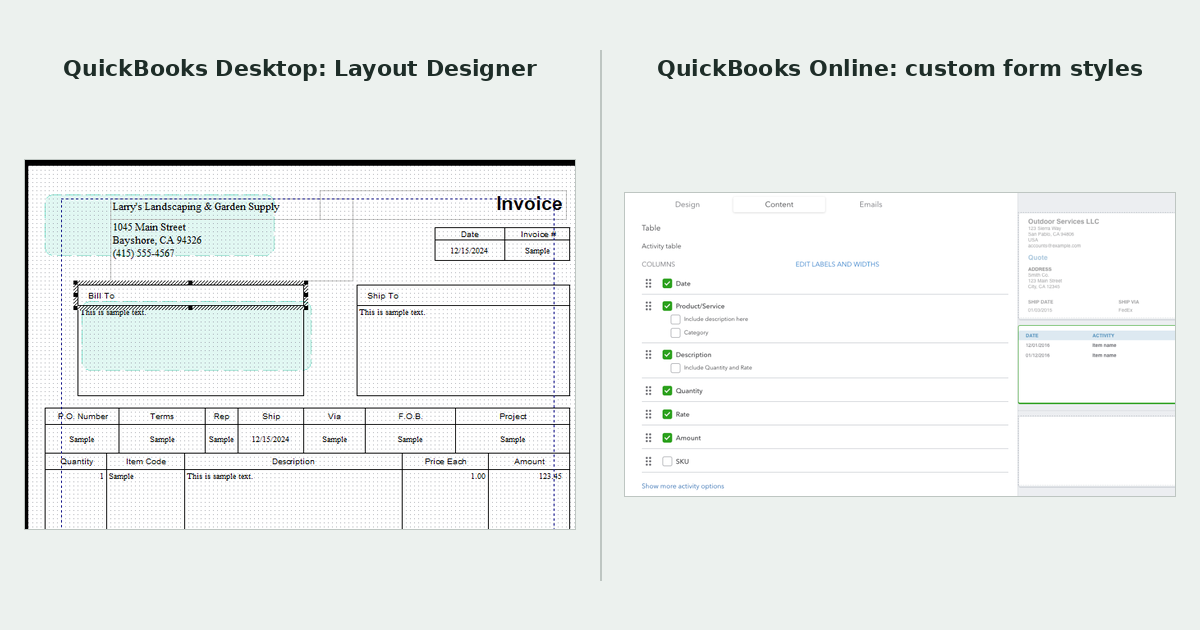
Desktop: Layout Designer
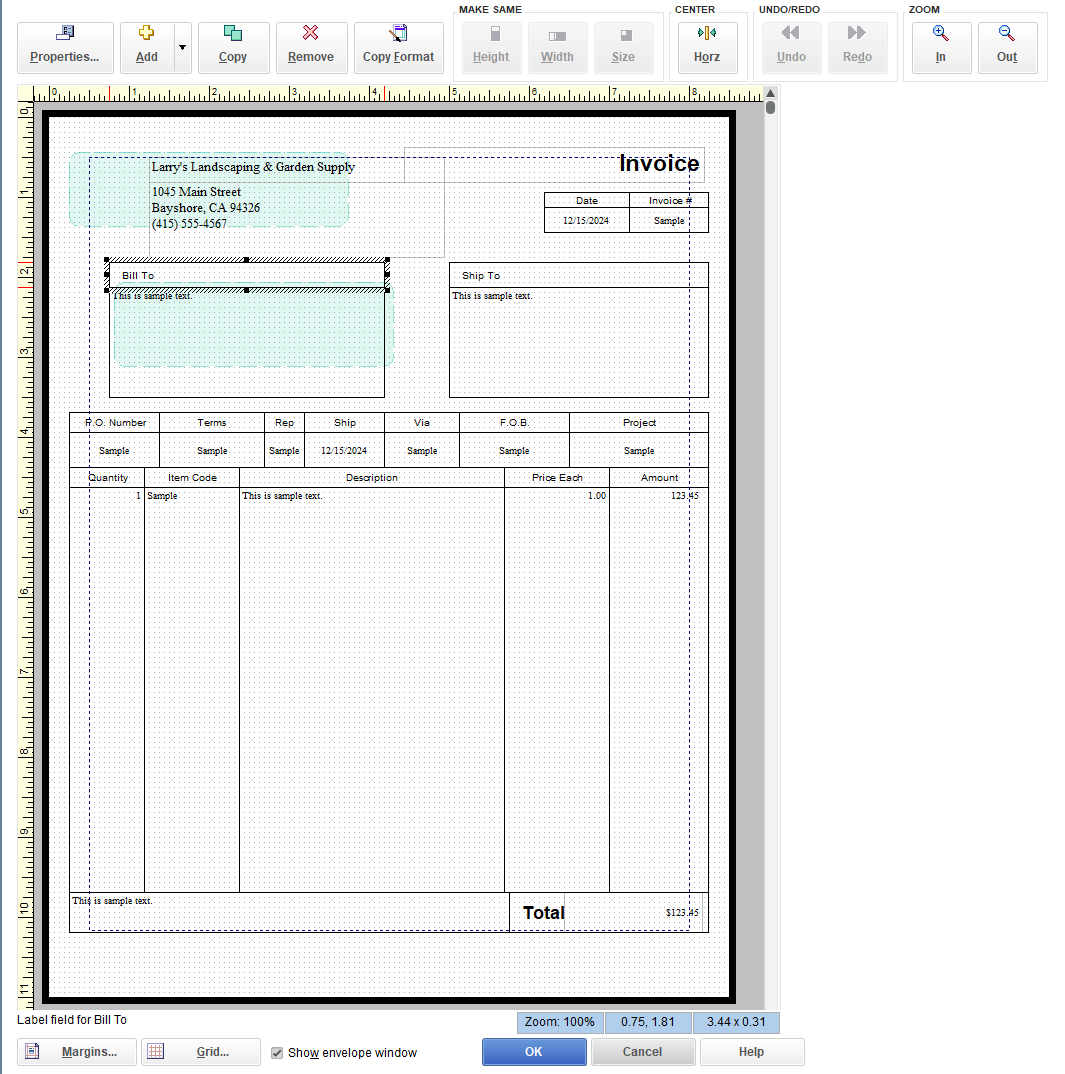
In Desktop, every form template has a Layout Designer. You can drag any field anywhere on the page, resize it, add text boxes, lines and extra logos, and line the address up with a window envelope. You can keep as many templates per form as you like and pick one per customer.
QuickBooks Online: custom form styles
QuickBooks Online uses custom form styles (Settings, then Custom form styles). For invoices, estimates, sales receipts, sales orders and purchase orders, you can:
- pick one of a set of layouts
- change the colors, font and logo
- choose which header fields, columns and footer text show, and rename some of them
- make some columns wider or narrower
You can't place a field where you want it, add free text boxes or images, or match a layout a customer or regulator has given you. Intuit's support team has said QuickBooks Online can't match a set layout exactly.
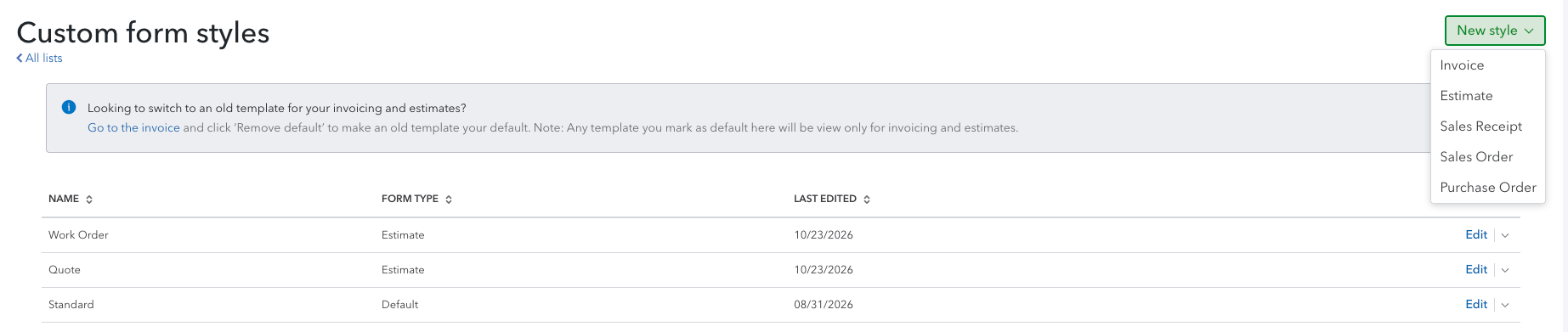
Intuit is also moving invoices and estimates to a newer layout. In our testing in October and November 2026, new invoices and estimates started on Intuit's modern template, and you have to pick an older custom style each time if you want it.
What happens to each form when you convert
| Form | After you move to QuickBooks Online |
|---|---|
| Invoice, estimate, sales receipt | Custom form styles, with fixed layouts. Your Desktop templates don't convert. Your logo does |
| Sales order | Custom form styles, with fixed layouts |
| Purchase order | Custom form styles, with fixed layouts. "Approved by" and "Date" lines are always printed |
| Customer statement | No template at all. PO numbers can't show as a column |
| Credit memo | No custom form style |
| Packing slip | Prints from the invoice in one fixed format |
| Work order | Doesn't exist. Most people adapt an estimate |
| Remittance advice | Doesn't exist in the US edition. Here are the workarounds |
| Quote | An estimate with a different name. Where it still says "Estimate" |
| Letters and mailing labels | Don't exist |
Two other things change on the way:
- Your PO number field moves. Intuit's converter puts the Desktop PO number into Custom Field 1 on the invoice. It prints if the field is set to print, but it won't appear on statements. See How to add custom fields in QuickBooks Online for how many fields each plan allows and how many will print.
- Custom fields on names and items don't convert. Note them down before you move.
Your options
- Rebuild in custom form styles. Free and quick, and fine if your customers don't mind a change of look.
- Keep a Word template and copy the numbers in. You get any layout you like, but you retype every document.
- Use an app that fills your own layout from QuickBooks data. This is the route if your forms need to look a specific way, or you produce documents QuickBooks Online doesn't have.
Whichever you choose, take a PDF of every form template before you convert, printed from a real transaction. Desktop templates don't come across, and you'll want them to copy from.
Gaps and the apps that fill them
For most gaps, the first step is checking whether Advanced already covers it. After that, these are well-regarded apps that connect to QuickBooks Online:
| Gap | Built into QuickBooks Online | Apps to look at |
|---|---|---|
| Assemblies, multiple warehouses, lot and serial numbers | Advanced has average cost, reorder points and units of measure | SOS Inventory, Katana |
| Construction: AIA pay applications, retainage | Advanced has construction job costing and progress billing | Knowify, JobTread |
| Advanced reporting and consolidation | Advanced has a custom report builder | Fathom, Syft |
| Importing, editing or deleting transactions in bulk | Advanced has batch invoices and expenses | SaasAnt Transactions, Transaction Pro |
| Time tracking for crews | QuickBooks Time | ClockShark |
| Donor management for nonprofits | Classes and locations | Neon CRM, DonorPerfect |
| Sales rep commissions | Classes or a custom field | Sales Cookie |
| Paying bills | Bill Pay | BILL, Melio |
| Backups | — | Rewind |
Check each app's QuickBooks App Store listing for current pricing and reviews before you commit.
Which plan matches your Desktop edition
| You use | Start by trialing | Watch out for |
|---|---|---|
| Pro or Pro Plus, 1 to 3 users | Essentials, or Plus if you track inventory | Essentials has no inventory, projects or purchase orders |
| Premier or Premier Plus | Plus | 5 users, 250 accounts, 40 classes and locations combined |
| Premier Contractor | Plus, or Advanced for job costing | AIA billing and retainage need Advanced or an app |
| Premier Manufacturing & Wholesale | Plus with an inventory app | No assemblies in any QuickBooks Online plan |
| Premier Nonprofit | Plus | No donor tracking. Use classes plus a donor app |
| Enterprise | Advanced, or Intuit Enterprise Suite | Advanced Inventory, user permissions, file size |
Should you switch?
| If this sounds like you… | Our suggestion |
|---|---|
| Service business, standard invoices, a few users | Switch. Plus or Essentials will cover it |
| You want your accountant to work in your books | Switch |
| Your Desktop version has been discontinued | Switch, or upgrade Desktop to stay supported |
| Product business with assemblies or kits | Wait, or plan for an inventory app from day one |
| Enterprise with Advanced Inventory | Compare Advanced and Intuit Enterprise Suite first |
| Customers or regulators expect a specific invoice or statement layout | Switch, but plan how you'll produce those documents first |
| You often work without internet | Stay on Desktop for now |
If you decide to move, first save a PDF of every form template and of the memorized reports you rely on. Neither comes across in the conversion.
Frequently asked questions
Is QuickBooks Online the same as QuickBooks Desktop?
No. They share a name and most of the basics, but they're separate products. QuickBooks Online runs in a browser and gets new features. Desktop is installed on a computer and has some features Online doesn't, such as Layout Designer, assemblies and Advanced Inventory.
Is QuickBooks Online cheaper than Desktop?
It depends on the plan you need. QuickBooks Online is $38 to $340 a month, and Desktop subscriptions have also been rising. Compare what you'd pay for the plan you actually need, plus any apps, against your next Desktop renewal.
Can I make QuickBooks Online invoices look like my Desktop invoices?
Not exactly. Custom form styles let you change the colors, fonts, logo and which fields show, but not where fields sit on the page. To keep a specific layout, use a Word template or an app that fills one from your QuickBooks data.
Does QuickBooks Online have a Layout Designer?
No. The closest thing is custom form styles, which offer fixed layouts.
Can I customize customer statements in QuickBooks Online?
Only your logo and company details. There's no statement template to edit, and custom fields such as a PO number don't appear on statements.
Which QuickBooks Online plan is closest to Desktop Premier?
Plus. It has inventory, projects, sales orders, purchase orders and class tracking for up to 5 users. If you need more users or batch invoicing, look at Advanced.
Will my data transfer?
Most of it. Lists, transactions and balances come across. Form templates, memorized reports, price levels, the audit trail and some list details don't.
Can I go back to Desktop if Online doesn't work out?
Moving back is much harder than moving forward, so treat the switch as one-way. Keep your Desktop file and backups after you switch.
Need your invoices to look the way they did in Desktop? Missing Toolkit: Templates fills your own Word templates from QuickBooks Online data: invoices, estimates, customer statements, purchase orders, credit memos, packing slips, work orders and remittance advice, with your layout and your columns. Free 30-day trial, no credit card.